After I log into Windows 7, I select and right click to copy a file and try to paste the file, the paste options are not working. Similarly Ctrl-C and Ctrl-V also doesn't work.
To solve the problem, just turning off the shared clipboard feature.
Showing posts with label windows 7 how-to. Show all posts
Showing posts with label windows 7 how-to. Show all posts
Saturday, August 21, 2010

Wednesday, June 10, 2009
Format Sticky Notes Text By Keyboard Commands
Sticky Notes in Windows 7 is very useful.ALso you can format the text to make Sticky Notes more pretty.
After Sticky Notes is running,you can use following keyboard commands to format text you wish:
Bold: CTRL+B
Bullet list: CTRL+SHIFT+L (once)
Decrease size of text: CTRL+SHIFT+<
Strikethrough: CTRL+T
Increase size of text: CTRL+SHIFT+>
Italics: CTRL+I
Numbered list: CTRL+SHIFT+L (twice)
Underline: CTRL+U
Roman numeral list (i,ii, etc.): CTRL+SHIFT+L (five times)
Lettered list(a,b, etc.): CTRL+SHIFT+L (three times)


Tuesday, June 9, 2009
Disable and Remove "Send Feedback" link
You might noticed the small "Send Feedback" link present in titlebar of all windows and dialog.
Without patch,delete or modify files,remove "Send Feedback" perfectly.It's how to.
First,Create a Disable-Feedback.reg file and copy the following red content into the reg file.
Windows Registry Editor Version 5.00
[HKEY_CURRENT_USER\Control Panel\Desktop]
"FeedbackToolEnabled"=dword:00000000
Save the file.Then Double Click it to run.Click the "Yes" Button to Import Registry Editor.
Log out.Enjoy yourself!!!
Without patch,delete or modify files,remove "Send Feedback" perfectly.It's how to.
First,Create a Disable-Feedback.reg file and copy the following red content into the reg file.
Windows Registry Editor Version 5.00
[HKEY_CURRENT_USER\Control Panel\Desktop]
"FeedbackToolEnabled"=dword:00000000
Save the file.Then Double Click it to run.Click the "Yes" Button to Import Registry Editor.
Log out.Enjoy yourself!!!
Sunday, June 7, 2009
Display Text on Windows 7 Taskbar Button
When you use windows 7 first,have you find Taskbar Buttons in Windows 7 isdifferent from windows Vista/Xp.There is any text labeling on taskbar.Only icon based button is displayed on it.
If you dosen't know how to display text like Windows Vista or XP,try it as below easily.
1.On the empty section of Taskbar,right click and select " Properties ".
2.On the Taskbar tab,go to Taskbar buttons dropdown box to change.Its default setting is "Always combine, hide labels",please choose either "Never combine" or "Combine when taskbar is full" option.
 3. Click OK button to save the setting.
Now buttons with text labeled show in the taskbar.
 If you want to use small icons like Windows Vista or XP in win7,on the step 2,you can check the“Use small icons” and save.

If you dosen't know how to display text like Windows Vista or XP,try it as below easily.
1.On the empty section of Taskbar,right click and select " Properties ".
2.On the Taskbar tab,go to Taskbar buttons dropdown box to change.Its default setting is "Always combine, hide labels",please choose either "Never combine" or "Combine when taskbar is full" option.
 3. Click OK button to save the setting.
Now buttons with text labeled show in the taskbar.
 If you want to use small icons like Windows Vista or XP in win7,on the step 2,you can check the“Use small icons” and save.
Saturday, June 6, 2009
Turn On windows 7 firewall
Windows 7 Firewall is very useful.It help prevent hackers from gaining access to our computer through the Internet network.
If you don't know where to turn on Windows Firewall in Windows 7.Here is how-to.
1.Click start buttom and Open the Control Panel.
2.Double Click on the Windows Firewall icon.
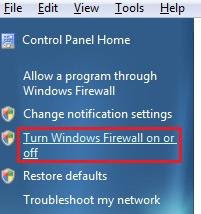
3.Choose the "Turn Windows Firewall on or off" in the left pane.
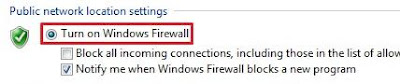
4.Select " Turn on Windows Firewall".Also Check the Windows Firewall notifications settings you want below the "Public newwork location settings".
Such as:
* Block all incoming connections,including those in the list of allowed programs
* Notify me when windows firewall blocks a new program
 5. Click on OK buttom.And close the Windows Firewall window when done.
Now your Windows 7 Firewall start to work.
If you installed Kaspersky Internet Security or other firewall software in windows 7,you'd bettle turn off Windows Firewall.
If you don't know where to turn on Windows Firewall in Windows 7.Here is how-to.
1.Click start buttom and Open the Control Panel.
2.Double Click on the Windows Firewall icon.
3.Choose the "Turn Windows Firewall on or off" in the left pane.

4.Select " Turn on Windows Firewall".Also Check the Windows Firewall notifications settings you want below the "Public newwork location settings".
Such as:
* Block all incoming connections,including those in the list of allowed programs
* Notify me when windows firewall blocks a new program
 5. Click on OK buttom.And close the Windows Firewall window when done.
Now your Windows 7 Firewall start to work.
If you installed Kaspersky Internet Security or other firewall software in windows 7,you'd bettle turn off Windows Firewall.
Friday, June 5, 2009
Enable Remote Desktop in Windows 7
I want to remote desktop to the Windows 7 computer in my workshop,so I can play with it.When I get the challenge for login but then "authentication error".Do you know the resolution?Thanks
I faced similar problem too.First you should turn on and use Remote Desktop in Windows 7.
Here is how to do.
1.Click the start and right click on " Computer" to choose the "Properties".
2. Now you click the " Remote settings" in the panel.It will pop uo a new window.
3.Check on the "Allow Remote Assistance to this Computer" option on Remote tab.Also,turn on any one of the options mentioned as you want.Such as "Allow connects from computers running any version of Remote Desktop(less secure) or Allow connections only from computers running Remote Desktop with Network Level Authentication(more secure).
4.Click OK buttom.You can remote desktop to the Windows 7 easily.
I faced similar problem too.First you should turn on and use Remote Desktop in Windows 7.
Here is how to do.
1.Click the start and right click on " Computer" to choose the "Properties".
2. Now you click the " Remote settings" in the panel.It will pop uo a new window.
3.Check on the "Allow Remote Assistance to this Computer" option on Remote tab.Also,turn on any one of the options mentioned as you want.Such as "Allow connects from computers running any version of Remote Desktop(less secure) or Allow connections only from computers running Remote Desktop with Network Level Authentication(more secure).
4.Click OK buttom.You can remote desktop to the Windows 7 easily.
Thursday, June 4, 2009
Hiding the vmware_user account
After I install windows 7 successfully,I install VMware Server Workstation.When reboot the computer,I find the vmware user account appearing on the logon screen.As I known that system will create vmware user account after installing VMware.But it don't show on the logon screen.Now i has the question.How to hide this account in windows 7?
It’s a simple method to hide this account.Note you must be the "administrator"
1.Click"start"->"run"->type "regedit" and press "Enter" to Open Registry Editor
2. navigate to
HKLM\SOFTWARE\Microsoft\Windows NT\CurrentVersion\Winlogon
3.If it does not already exist, create a key named SpecialAccounts
4.Below the SpecialAccounts key create another key named UserList
Create a new DWORD value (DWORD32 on x64) inside UserList named vmware_user account and ensure the 0 value
5.Close Registry Editor.Without reboot or logoff.
Command line for hide the vmware_user account in windows 7:
REG ADD "HKLM\SOFTWARE\Microsoft\Windows NT\CurrentVersion\Winlogon\SpecialAccounts\UserList" /v __vmware_user__ /d 0 /t REG_DWORD /f
It’s a simple method to hide this account.Note you must be the "administrator"
1.Click"start"->"run"->type "regedit" and press "Enter" to Open Registry Editor
2. navigate to
HKLM\SOFTWARE\Microsoft\Windows NT\CurrentVersion\Winlogon
3.If it does not already exist, create a key named SpecialAccounts
4.Below the SpecialAccounts key create another key named UserList
Create a new DWORD value (DWORD32 on x64) inside UserList named vmware_user account and ensure the 0 value
5.Close Registry Editor.Without reboot or logoff.
Command line for hide the vmware_user account in windows 7:
REG ADD "HKLM\SOFTWARE\Microsoft\Windows NT\CurrentVersion\Winlogon\SpecialAccounts\UserList" /v __vmware_user__ /d 0 /t REG_DWORD /f
Tuesday, May 12, 2009
Fix the desktop.ini Startup bug in Windows 7 7057
After i install Windows 7 Build 7057, a text file open during login every time.It's the desktop.ini bug in windows 7. How to fix it?
Here is the method.
1) Navigate to
C:\ProgramData\Microsoft\Windows\Start Menu\Programs\Startup
2) Find the desktop.ini file and delete it.
3) Navigate to
C:\Users\%username%\AppData\Roaming\Microsoft\Windows\Start Menu\Programs\Startup
4) If you Find desktop.ini file there.And Delete it.
5) Reboot your computer and the desktop.ini will not appear again.
Here is the method.
1) Navigate to
C:\ProgramData\Microsoft\Windows\Start Menu\Programs\Startup
2) Find the desktop.ini file and delete it.
3) Navigate to
C:\Users\%username%\AppData\Roaming\Microsoft\Windows\Start Menu\Programs\Startup
4) If you Find desktop.ini file there.And Delete it.
5) Reboot your computer and the desktop.ini will not appear again.
Monday, May 4, 2009
windows xp upgrade to windows 7
Are you looking to upgrade from xp pro to windows 7 beta, you can read our upgrade process overview here.
According to Computerbase website,if Windows XP users purchase Windows 7,Microsoft will be offering upgrades xp to windows 7.it's possibility to upgrade from XP to Windows 7 directly.
But will Microsoft reduce price for us to purchase?What price would you be willing to pay for the upgrade?I don't know now.
According to Computerbase website,if Windows XP users purchase Windows 7,Microsoft will be offering upgrades xp to windows 7.it's possibility to upgrade from XP to Windows 7 directly.
But will Microsoft reduce price for us to purchase?What price would you be willing to pay for the upgrade?I don't know now.
Monday, April 27, 2009
Create Native Virtual Hard Disk (VHD) in Windows 7
You can native boot from a virtual hard disk without a hypervisor in Windows 7.
1.Right Click on My Computer and Click 'Manage'.Computer Management will open up,then click on Disk Management on the left.
2.Right Click on Disk Management.And select 'Create VHD' in the menu.new windows 'Create and Attach Virtual Hard Disk' will be opened.
3.Make sure you have sufficient free space,choose dynamically expanding VHD format for the purpose..Click on OK
4. This step is initializing the disk.
Right Click on Disk 1 (Blue icon) and click on 'Initialize' which open a new window 'Initialize Disk.'
Select the partition and click on 'OK'.
5.When you see its status is changed to Online. Right Click on the 'Unallocated' area and select 'New Simple Volume' to launch 'New Simple Volume Wizard.'
After that click on next and specify size, we will keep the default NTFS File System and select the complete size i.e. 20 GB and click on 'Next' to specify drive letter. I will select Drive Letter 'X:' and click on 'Next'
6.On the next page we will select Label for the drive and click on 'Next.'
Click on 'Finish' to continue.
Now we have successfully created a new Virtual Hard Disk.
1.Right Click on My Computer and Click 'Manage'.Computer Management will open up,then click on Disk Management on the left.
2.Right Click on Disk Management.And select 'Create VHD' in the menu.new windows 'Create and Attach Virtual Hard Disk' will be opened.
3.Make sure you have sufficient free space,choose dynamically expanding VHD format for the purpose..Click on OK
4. This step is initializing the disk.
Right Click on Disk 1 (Blue icon) and click on 'Initialize' which open a new window 'Initialize Disk.'
Select the partition and click on 'OK'.
5.When you see its status is changed to Online. Right Click on the 'Unallocated' area and select 'New Simple Volume' to launch 'New Simple Volume Wizard.'
After that click on next and specify size, we will keep the default NTFS File System and select the complete size i.e. 20 GB and click on 'Next' to specify drive letter. I will select Drive Letter 'X:' and click on 'Next'
6.On the next page we will select Label for the drive and click on 'Next.'
Click on 'Finish' to continue.
Now we have successfully created a new Virtual Hard Disk.
Sunday, April 26, 2009
How to install Ubuntu on Windows 7 beta?
On my laptop I have runned windows 7 beta.Because I need to do work in ubuntu,I want to install ubuntu on windwos 7.But I can not find the way how to install ubuntu.
This is what you are searching for answers.I tell you that do not install Ubuntu on Windows 7 necessarily.
If you have two primary partitions,on partition A install Windows 7 and on Partition B install Ubuntu.So you run them along side each other.
If you can't boot Windows 7 after installing Ubuntu.Please Follow these steps below in ubuntu:
Choose Applications > Accessories > Terminal
then enter the command:
sudo gedit /boot/grub/menu.lst
This command help you open menu.lst file like Notepad,and you add these lines at the end(note if you have Windows installed in C):
title windows 7 (Loader)
root (hd0,0)
savedefault
makeactive
chainloader +1
and save the file by using the command " :wq ".
If you have any question for help,please visit ubuntu forums.
This is what you are searching for answers.I tell you that do not install Ubuntu on Windows 7 necessarily.
If you have two primary partitions,on partition A install Windows 7 and on Partition B install Ubuntu.So you run them along side each other.
If you can't boot Windows 7 after installing Ubuntu.Please Follow these steps below in ubuntu:
Choose Applications > Accessories > Terminal
then enter the command:
sudo gedit /boot/grub/menu.lst
This command help you open menu.lst file like Notepad,and you add these lines at the end(note if you have Windows installed in C):
title windows 7 (Loader)
root (hd0,0)
savedefault
makeactive
chainloader +1
and save the file by using the command " :wq ".
If you have any question for help,please visit ubuntu forums.
Saturday, April 25, 2009
How to disabling nvidia powermizer in Windows 7?
First i has an Nvidia card right.I has disabled nvidia PowerMizer for Vista with registry instructions before.Now My computer has install Windows 7 BETA build 7000,and I am experiencing windows Aero performance issues.But it is a few things from Windows 7.I can't disabled PowerMizer in Windows 7.If you have done successfully,please tell me hot to do?
As for me,I am using driver version 179.28 beta with a GeForce 8600m GT. But I haven't had issues with Aero and PowerMizer.In my mind,Try changing Nvidia driver versions.It makes a difference and maybe disable in windows 7.
By the way,Powermizer will only detect ac/battery when the Nvidia driver service is started.
You can download the drivers here.
http://www.nvidia.com/Download/index.aspx?lang=en-us
As for me,I am using driver version 179.28 beta with a GeForce 8600m GT. But I haven't had issues with Aero and PowerMizer.In my mind,Try changing Nvidia driver versions.It makes a difference and maybe disable in windows 7.
By the way,Powermizer will only detect ac/battery when the Nvidia driver service is started.
You can download the drivers here.
http://www.nvidia.com/Download/index.aspx?lang=en-us
How to download drivers for Windows 7 Beta?
My computer is Dell Dim4600.I has just installed Windows 7 Beta and runned. But I don't know hot to
install drivers for it.Also where I can download the drivers for Windows 7?
Does anybody know?Please and Thank you.
Your best bet is to go to the microsoft's websites.Here is http://www.microsoft.com/windows/windows-7/
You can find if they offer drivers for Windows 7. If not, try looking for Vista drivers as they should work just fine in windows 7.
install drivers for it.Also where I can download the drivers for Windows 7?
Does anybody know?Please and Thank you.
Your best bet is to go to the microsoft's websites.Here is http://www.microsoft.com/windows/windows-7/
You can find if they offer drivers for Windows 7. If not, try looking for Vista drivers as they should work just fine in windows 7.
What do you think of Windows 7?
If you have been fortunate enough to try Windows 7 Operating System. What do you think?
Is windows 7 better than XP? Better than Vista?
How is the driver model? Can it run on Quad Core machines?
Windows 7 is looking to be very impressive.And Vista drivers will work for Windows 7.
It's designed to be able to run on laptops so it's very efficient. It's better than Vista (which is already better than XP).
Is windows 7 better than XP? Better than Vista?
How is the driver model? Can it run on Quad Core machines?
Windows 7 is looking to be very impressive.And Vista drivers will work for Windows 7.
It's designed to be able to run on laptops so it's very efficient. It's better than Vista (which is already better than XP).
How to transparent the taskbar in Windows 7?
Recently I has installed windows 7 beta Build 7057.But i can't use transparent taskbar which look like in windows vista.Can you help me to change the Minimize, Maximize,Close buttons to became
transparent.
In my mind,transparent the taskbar in Windows vista by using windows aero.If you don't have enough graphics memory, it isn't support.You'd better use vista drivers for your graphics card and download the drivers needed to update.
transparent.
In my mind,transparent the taskbar in Windows vista by using windows aero.If you don't have enough graphics memory, it isn't support.You'd better use vista drivers for your graphics card and download the drivers needed to update.
How much Money will Windows 7 cost?
I have runned windows Vista for 64 bit.And i want to upgrade to Windows 7,because Vista is horrible.How much Money will Windows 7 upgrade from Vista cost?And Many people will get a free upgrade since July and January ?Or if you already have one, will you be able to get the free upgrade?
Now I have the beta for windows 7. windows 7 can run on a much lower end computer in its ability .Vista isn't actually all bad,while windows 7 have the biggest change.Also you check here to view the price listed for updates when they are posted:
http://www.microsoft.com/windows/windows-7/
Now I have the beta for windows 7. windows 7 can run on a much lower end computer in its ability .Vista isn't actually all bad,while windows 7 have the biggest change.Also you check here to view the price listed for updates when they are posted:
http://www.microsoft.com/windows/windows-7/
How to Back Up vista Before Installing Windows 7 Beta?
Now I'm running vista .I want to upgrade to windows 7 beta, but how to complete save my computer as is, before windows 7 beta is flawed.
So, I want to have a back up of programs docs basically everything in case i need to revert to vista.
First don't install windows 7 beta OS system, if you don't know how to backup your system and files.If need,in my option the best and fastest way is to ghost it,to make an image of it on your HD.
Also you can install the new windows 7 into the new partition and then boot windows 7 and windows vista.It's better than install windows 7 only.so you don't need to backup data.
So, I want to have a back up of programs docs basically everything in case i need to revert to vista.
First don't install windows 7 beta OS system, if you don't know how to backup your system and files.If need,in my option the best and fastest way is to ghost it,to make an image of it on your HD.
Also you can install the new windows 7 into the new partition and then boot windows 7 and windows vista.It's better than install windows 7 only.so you don't need to backup data.
Friday, April 24, 2009
Why I burn windows 7 to more than one disk?
I has a question to ask you.I am downloading windows 7 in parts from megaupload and I have more than one cd. I have 10 cd-rs and I want to know if I can boot windows 7 in parts?
Answer:
Notice that The ISO you got must be a DVD format only which Windows 7 is distributed as,so you require a DVD writer and DVD.
If you have not downloaded the ISO,here’s the link to the Windows 7 Beta installation page:
http://www.microsoft.com/windows/windows-7/beta-installation-instructions.aspx
then you can burn that onto a disc and then go to the microsoft site to Get a key for the windows 7 Beta product.
Answer:
Notice that The ISO you got must be a DVD format only which Windows 7 is distributed as,so you require a DVD writer and DVD.
If you have not downloaded the ISO,here’s the link to the Windows 7 Beta installation page:
http://www.microsoft.com/windows/windows-7/beta-installation-instructions.aspx
then you can burn that onto a disc and then go to the microsoft site to Get a key for the windows 7 Beta product.
How to uninstall Windows 7 then install Vista?
After installed Windows 7,the computer always get a blue screen of death .and I want it to stop by putting windows vista back on it.with the help of 2-3 Vista cds,I just gotta know the way how to uninstall Windows 7 and then install vista again.
Please help me and tell me on a step by step process.Thanks very much.
Answer:
1.By changing some BIOS settings,make sure your computer can boot from CD.
Put the vista disc in computer.Then reboot it.
while Vista start to install,choose a partition to install on your computer.
Remove the already existing partitions to get rid of Windows 7 on your computer. Choose to install Vista on a new partition.Rest is pretty straightforward.
2.You need to download drivers for the hardware in your computer when installing vista.
If the computer was purchased from a manufacturer, then the drivers should be available for free on their website.
Note:Make sure you backup any data you want saved from Windows 7 though, because once you delete the partition it is on.
Please help me and tell me on a step by step process.Thanks very much.
Answer:
1.By changing some BIOS settings,make sure your computer can boot from CD.
Put the vista disc in computer.Then reboot it.
while Vista start to install,choose a partition to install on your computer.
Remove the already existing partitions to get rid of Windows 7 on your computer. Choose to install Vista on a new partition.Rest is pretty straightforward.
2.You need to download drivers for the hardware in your computer when installing vista.
If the computer was purchased from a manufacturer, then the drivers should be available for free on their website.
Note:Make sure you backup any data you want saved from Windows 7 though, because once you delete the partition it is on.
Subscribe to:
Comments (Atom)