If you want to upgrade your Windows operating system to Windows 7 and install windows 7 on another partition with windows xp/vista still on hard drive,you will get a big Issue how to Delete Undeletable Files in Windows 7.
Here are two command line syntaxes which can delete undeletable files or directories in windwos 7.
For Files:
takeown /f file_name /d y
icacls file_name /grant administrators:F
For Directories :
takeown /f directory_name /r /d y
icacls directory_name /grant administrators:F /t
Note you are the administrator or a part of administrator group to run the command.
via BlogsDNA
Showing posts with label windows 7 skill. Show all posts
Showing posts with label windows 7 skill. Show all posts
Saturday, June 20, 2009

Burn ISO File Image by Burning Tool
Now with the help of windwos 7,we can burn a ISO file image without the cd burn software such as Nero.Also the Burning Tool is integrated with Explorer shell.
Burning Tool is very simply to do and it will be easier to burn Linux LiveCDs with windows 7.
1.Create a iso file by winrar or winiso.I think you should known how to do.
2.Then left click the ISO file to select the "burn disc image" in the menu.
3.A Windows disc Image burner dialog box will appear.Select the CD or DVD writer drive to use.
4.If you have verify known burning process is done properly,Check the "Burn" button to start burning.
5.When it's done,click the close button to finish.
Burning Tool is very simply to do and it will be easier to burn Linux LiveCDs with windows 7.
1.Create a iso file by winrar or winiso.I think you should known how to do.
2.Then left click the ISO file to select the "burn disc image" in the menu.
3.A Windows disc Image burner dialog box will appear.Select the CD or DVD writer drive to use.
4.If you have verify known burning process is done properly,Check the "Burn" button to start burning.
5.When it's done,click the close button to finish.
Friday, June 19, 2009
Network Location Awareness Service
What's Network Location Awareness Service for windows 7.
Network configuration information is collected and stored by it.
You can go to Services, it lists it as Automatic (Started) as default.Right click on it to disable this service,some services depend on it will fail to start.
Network configuration information is collected and stored by it.
You can go to Services, it lists it as Automatic (Started) as default.Right click on it to disable this service,some services depend on it will fail to start.
Monday, June 15, 2009
Windows 7 ReBoot Time Script
Are you need to see what your Windows 7 restart time is?
It takes my windows 7 to restart back to the desktop in 95 seconds.
 Here is how to have a test:
1.Create a ReBoot-Time.vbs script file and copy below red texts as the contents of the file:
Option Explicit
On Error Resume Next
Dim Wsh, Time1, Time2, Result, PathFile, MsgResult, MsgA, AppName, KeyA, KeyB, TimeDiff
MsgA = "Please close all running applications and click on OK."
KeyA = "HKEY_CURRENT_USER\Software\RestartTime\"
KeyB = "HKEY_CURRENT_USER\Software\Microsoft\Windows\CurrentVersion\Run\RestartTime"
AppName = "Restart-Time"
Set Wsh = CreateObject("WScript.Shell")
PathFile = """" & WScript.ScriptFullName & """"
Result = wsh.RegRead(KeyA & "Times")
if Result = "" then
MsgResult = Msgbox (MsgA, vbOKCancel, AppName)
If MsgResult = vbcancel then WScript.Quit
Wsh.RegWrite KeyA & "Times", left(Time,8), "REG_SZ"
Wsh.RegWrite KeyB, PathFile, "REG_SZ"
Wsh.Run "cmd /c Shutdown -r -t 00", false, 0
else
Wsh.RegDelete KeyA & "Times"
Wsh.RegDelete KeyA
Wsh.RegDelete KeyB
TimeDiff = DateDiff("s",Result,left(Time,8))
MsgBox "Your computer restarts in " & TimeDiff & " seconds", VbInformation, AppName
end if
wscript.Quit
2.Right click on the ReBoot-Time.vbs file and click on Properties.Unblock the file under the "General" tab.

3.Launch the ReBoot-Time.vbs file and a dialog box displays "close all running applications and click on OK" message.Click the OK button to restart the computer.
4.When login the computer,you can see your reboot time.
It takes my windows 7 to restart back to the desktop in 95 seconds.
 Here is how to have a test:
1.Create a ReBoot-Time.vbs script file and copy below red texts as the contents of the file:
Option Explicit
On Error Resume Next
Dim Wsh, Time1, Time2, Result, PathFile, MsgResult, MsgA, AppName, KeyA, KeyB, TimeDiff
MsgA = "Please close all running applications and click on OK."
KeyA = "HKEY_CURRENT_USER\Software\RestartTime\"
KeyB = "HKEY_CURRENT_USER\Software\Microsoft\Windows\CurrentVersion\Run\RestartTime"
AppName = "Restart-Time"
Set Wsh = CreateObject("WScript.Shell")
PathFile = """" & WScript.ScriptFullName & """"
Result = wsh.RegRead(KeyA & "Times")
if Result = "" then
MsgResult = Msgbox (MsgA, vbOKCancel, AppName)
If MsgResult = vbcancel then WScript.Quit
Wsh.RegWrite KeyA & "Times", left(Time,8), "REG_SZ"
Wsh.RegWrite KeyB, PathFile, "REG_SZ"
Wsh.Run "cmd /c Shutdown -r -t 00", false, 0
else
Wsh.RegDelete KeyA & "Times"
Wsh.RegDelete KeyA
Wsh.RegDelete KeyB
TimeDiff = DateDiff("s",Result,left(Time,8))
MsgBox "Your computer restarts in " & TimeDiff & " seconds", VbInformation, AppName
end if
wscript.Quit
2.Right click on the ReBoot-Time.vbs file and click on Properties.Unblock the file under the "General" tab.

3.Launch the ReBoot-Time.vbs file and a dialog box displays "close all running applications and click on OK" message.Click the OK button to restart the computer.
4.When login the computer,you can see your reboot time.
Sunday, June 14, 2009
Shutdown button is icons not Text
Problem: When you click start and you see that 'Shut down' button on the Start menu is a plain text,but it only change this action to something else in a moment.This happens in windwos 7 by default.
If you try to make it a default action,it is the simple way to do:
How to Custom power switch in Windows 7
1.You should right click the start button,and select "Properties" in the menu.
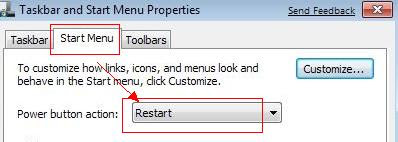
2.select "Star Menu " tab in the "Taskbar and Start Menu Properties" windows.Then set the "Power button action" to 'Restart' and apply it.
3.reboot your computer.
If you try to make it a default action,it is the simple way to do:
How to Custom power switch in Windows 7
1.You should right click the start button,and select "Properties" in the menu.
2.select "Star Menu " tab in the "Taskbar and Start Menu Properties" windows.Then set the "Power button action" to 'Restart' and apply it.

3.reboot your computer.
Friday, June 12, 2009
Start button search Guide
The Start button search in windows 7 is very intelligent. It can hunte for application and filename matches.
For example,If you search for "disk",not only applications appear,such as "Disk Cleanup" and "Disk Defragmenter",but also Control Panel such as "Protect your computer by encrypting data on your disk" or "Free up disk space by deleting unnecessary files".
In the features,I think Start button search will br more accessible.
For example,If you search for "disk",not only applications appear,such as "Disk Cleanup" and "Disk Defragmenter",but also Control Panel such as "Protect your computer by encrypting data on your disk" or "Free up disk space by deleting unnecessary files".
In the features,I think Start button search will br more accessible.
Keyboard Shortcuts for Windows Media Player 12
On Windows XP, video players is almost indispensable.watching a film,you need a package of codecs and a player like Mv2Player, BSplayer,etc.
With the launch of the operating system Windows 7, many users who have tested the new system were observed at least for movies by Windows Media Player 12.watching a movie on Windows 7, without any another video player or the installed codecs, but you need to know some useful commands for Windows Media Player 12.
Windows Media Player 12 – Keyborad Shortcuts
- Open a file – CTRL+O
- Switch to full mode – CTRL+1
- Switch to skin mode – CTRL+2
- Play the previous item – CTRL+B
- Play the next item – CTRL+F
- Play or pause a file – CTRL+P
- Stop playback – CTRL+S
- Move the focus to the search box in the library – CTRL+E
- Turn shuffle on or off – CTRL+H
- Show or hide the Classic Menus (menu bar) in full mode – CTRL+M
- Create a playlist – CTRL+N
- Repeat the playlist – CTRL+T
- Close or stop playing a file – CTRL+W
- Rewind video – CTRL+SHIFT+B
- Show video in full screen – ALT+ENTER
- Turn captions and subtitles on or off – CTRL+SHIFT+C
- Fast-forward through video or music – CTRL+SHIFT+F
- Decrease the size of album art – SHIFT+F6
- Play faster than normal speed (time compression) – CTRL+SHIFT+G
- Play at normal speed - CTRL+SHIFT+N
- Play slower than normal speed (time expansion) – CTRL+SHIFT+S
- Open Help – F1
- Edit media information on a selected item in the library – F2
- Add media files to the library – F3
- Refresh information in the panes – F5
- Increase the size of album art – F6
- Mute the volume – F7
- Decrease the volume – F8
- Increase the volume – F9
- Show the Classic Menus (menu bar) -F10
- Switch to full-screen mode – F11
With the launch of the operating system Windows 7, many users who have tested the new system were observed at least for movies by Windows Media Player 12.watching a movie on Windows 7, without any another video player or the installed codecs, but you need to know some useful commands for Windows Media Player 12.
Windows Media Player 12 – Keyborad Shortcuts
- Open a file – CTRL+O
- Switch to full mode – CTRL+1
- Switch to skin mode – CTRL+2
- Play the previous item – CTRL+B
- Play the next item – CTRL+F
- Play or pause a file – CTRL+P
- Stop playback – CTRL+S
- Move the focus to the search box in the library – CTRL+E
- Turn shuffle on or off – CTRL+H
- Show or hide the Classic Menus (menu bar) in full mode – CTRL+M
- Create a playlist – CTRL+N
- Repeat the playlist – CTRL+T
- Close or stop playing a file – CTRL+W
- Rewind video – CTRL+SHIFT+B
- Show video in full screen – ALT+ENTER
- Turn captions and subtitles on or off – CTRL+SHIFT+C
- Fast-forward through video or music – CTRL+SHIFT+F
- Decrease the size of album art – SHIFT+F6
- Play faster than normal speed (time compression) – CTRL+SHIFT+G
- Play at normal speed - CTRL+SHIFT+N
- Play slower than normal speed (time expansion) – CTRL+SHIFT+S
- Open Help – F1
- Edit media information on a selected item in the library – F2
- Add media files to the library – F3
- Refresh information in the panes – F5
- Increase the size of album art – F6
- Mute the volume – F7
- Decrease the volume – F8
- Increase the volume – F9
- Show the Classic Menus (menu bar) -F10
- Switch to full-screen mode – F11
Friday, May 15, 2009
KB961367 windows 7 mp3 patch download
KB961367 for windows 7 beta can Fix Windows 7 MP3 Cut Off Corruption Issues in Windows Media Player 12
Note back up all your MP3 files first,
Then download and install KB961367 located on this page.
For 32-bit
Windows6.1-KB961367-x86.msu
For 64-bit
Windows6.1-KB961367-x64.msu
Note back up all your MP3 files first,
Then download and install KB961367 located on this page.
For 32-bit
Windows6.1-KB961367-x86.msu
For 64-bit
Windows6.1-KB961367-x64.msu
Pretty Windows Seven Folder Concept Icon
If you want to Transforme Windows XP Icon into Windows 7's,try to download the Folder Concept Icon file.That are folder images and look really good.

If you do't know how to change them with the Vista/xp apply them?Try Use Iconpackager or Tuneup Utilities 2008.
Download Windows Seven Folder Concept Icon
If you do't know how to change them with the Vista/xp apply them?Try Use Iconpackager or Tuneup Utilities 2008.
Download Windows Seven Folder Concept Icon
Sunday, May 10, 2009
Change Windows XP/vista Logon welcome screen Wallpaper
when you power up your Windows XP/vista computer,you will see the Windows XP/vista welcome screen probably.Are you want to use windows 7 Logon Wallpaper instead of XP/vista's?I talk you how to Change it.
First you should download the windows 7 Logon image or picture as long as it is a .jpg or .bmp
Second,Adding the windows 7 Logon Wallpaper.To do this follow the directions below:
1) Click on "star menu"-->"run".Type in "regedit",and press Enter to open the registry editor.
2) And you Navigate to:
HKEY USERS\ .DEFAULT\Control Panel\Desktop
3) On the right side Find the wallpaper value and double click
Then type in the full path of the image.Such as "C:\WINDOWS\System32\win7logon.jpg"
4) set "TileWallPaper" value to 1.Also set "WallPaperStyle" to 2.
5) Close all the things.
The next time you reboot your computer, the changes will take place.
First you should download the windows 7 Logon image or picture as long as it is a .jpg or .bmp
Second,Adding the windows 7 Logon Wallpaper.To do this follow the directions below:
1) Click on "star menu"-->"run".Type in "regedit",and press Enter to open the registry editor.
2) And you Navigate to:
HKEY USERS\ .DEFAULT\Control Panel\Desktop
3) On the right side Find the wallpaper value and double click
Then type in the full path of the image.Such as "C:\WINDOWS\System32\win7logon.jpg"
4) set "TileWallPaper" value to 1.Also set "WallPaperStyle" to 2.
5) Close all the things.
The next time you reboot your computer, the changes will take place.
Wednesday, May 6, 2009
Use "Command Prompt Here" in Windows 7
Here are some hidden right-click commands in windows 7 that you may not have known about.
Being a native Windows program,the Command Prompt can let you execute commands without using a GUI. It would automatically open a command prompt window in the directory that you had clicked on.Windows 7 includes this ability right out of the box.
You can hold down shift and right-click on the desktop.Then you will get the option to "Open Command Window Here."
This is very useful and will open a Command Prompt that is queued to your current directory.
Being a native Windows program,the Command Prompt can let you execute commands without using a GUI. It would automatically open a command prompt window in the directory that you had clicked on.Windows 7 includes this ability right out of the box.

You can hold down shift and right-click on the desktop.Then you will get the option to "Open Command Window Here."
This is very useful and will open a Command Prompt that is queued to your current directory.
Monday, April 27, 2009
Useful Shell command accessing folders in windows 7
You can use the Shell command by accessing the Windows Explorer.
There are Useful Lists of All Windows 7 Shell Commands which to open special folders directly from the start menu or run dialog window.note that the commands only use in windows 7.
shell:Libraries
shell:DocumentsLibrary
shell:User Pinned
shell:UsersLibrariesFolder
shell:PicturesLibrary
shell:ImplicitAppShortcuts
shell:Ringtones
shell:MusicLibrary
shell:VideosLibrary
shell:OtherUsersFolder
shell:Device Metadata Store
shell:PublicSuggestedLocations
shell:CommonRingtones
There are Useful Lists of All Windows 7 Shell Commands which to open special folders directly from the start menu or run dialog window.note that the commands only use in windows 7.
shell:Libraries
shell:DocumentsLibrary
shell:User Pinned
shell:UsersLibrariesFolder
shell:PicturesLibrary
shell:ImplicitAppShortcuts
shell:Ringtones
shell:MusicLibrary
shell:VideosLibrary
shell:OtherUsersFolder
shell:Device Metadata Store
shell:PublicSuggestedLocations
shell:CommonRingtones
Subscribe to:
Comments (Atom)